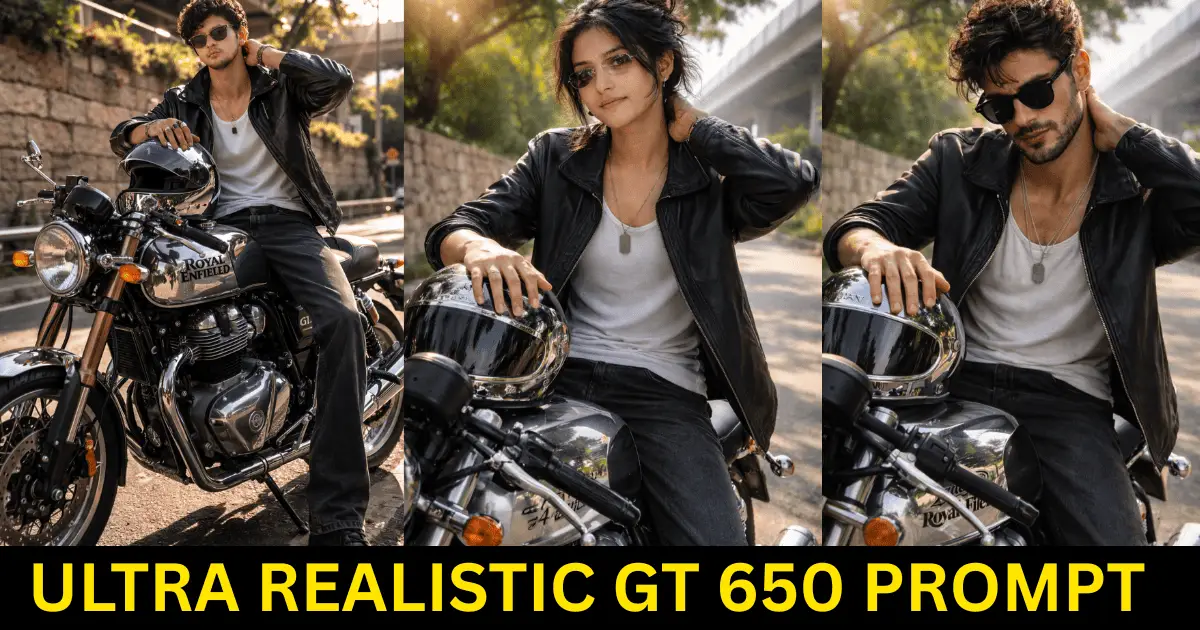
Ultra Realistic GT 650 Prompt is the best way to generate photorealistic Royal Enfield bike images using AI tools like Midjourney, DALL·E, and Stable Diffusion. This guide provides a fully optimized prompt structure for realistic lighting, natural pose, and cinematic outdoor photography style.
Ultra Realistic GT 650 Prompt bike visuals are rapidly becoming popular across AI image platforms, Instagram, and prompt-based content websites.
The main reason is realism. A well-structured prompt can generate images that look like real outdoor photography instead of artificial or overly cinematic renders.
This Ultra Realistic GT 650 Prompt is part of our AI prompt collection hosted on ai.saraprompts.com. For more detailed and premium prompts, visit our main website SaraPrompts where thousands of curated prompts are available. The main domain offers a complete prompt library for daily creators. Explore all prompts at saraprompts.
Unlike short and generic prompts, ultra-realistic prompts focus on natural lighting, camera perspective, subject posture, clothing texture, and environmental storytelling.
When these elements are described properly, the final AI output appears authentic, sharp, and visually professional.
Why Realistic Ultra Realistic GT 650 Prompt Perform So Well Online
Realistic bike images attract more engagement because they feel natural and believable. Instead of looking heavily edited or dramatic, they resemble genuine smartphone or DSLR photographs captured in real life.
- Natural lighting and soft shadows improve authenticity
- Realistic skin texture makes the subject look human
- Strong composition between subject and motorcycle
- Clear environment storytelling (roadside, trees, walls)
- Clean smartphone-style candid perspective
The Visual Formula of an Ultra-Realistic GT 650 Prompt
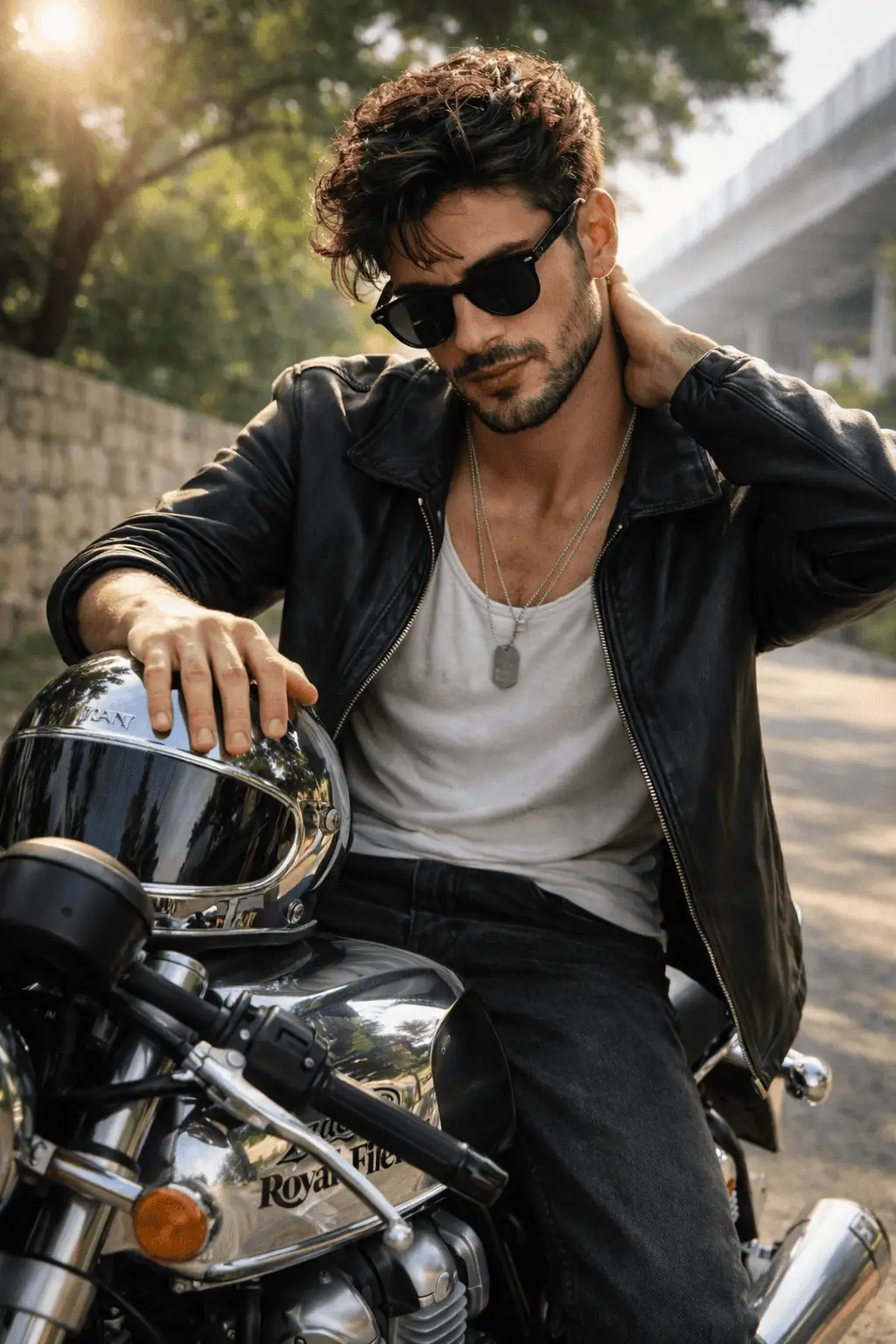
A powerful GT 650 prompt is never random. It follows a structured formula inspired by real photography techniques.
This structure helps AI understand scene depth, lighting physics, and natural human behavior.
1) Natural Camera Perspective
Using phrases like “handheld smartphone photo” or “eye-level shot” forces the AI to generate realistic angles instead of cinematic or artificial camera views.
2) Strong Subject Positioning
Describing how the person sits on the bike, hand placement, and body posture adds realism and makes the image feel natural instead of staged.
3) Authentic Lighting Direction
Mentioning morning sunlight, soft shadows, and sun-kissed glow helps simulate real-world lighting conditions, which significantly improves image quality.
4) Environmental Context
Including details like roadside, limestone wall, trees, and flyover prevents the AI from generating unrealistic studio backgrounds.
Pro Photography Look: Settings That Create Realism
If you want your AI-generated GT 650 images to look like real professional photos, your prompt should include realistic camera characteristics.
- Camera Style: Handheld smartphone or DSLR perspective
- Lighting: Bright natural morning sunlight
- Focus: Sharp subject with slightly soft background
- Depth of Field: Natural shallow depth for realism
- Grain: Slight natural grain (avoid over-smooth skin)
Pose & Styling: What Makes a GT 650 Prompt Look Premium
Natural body language plays a major role in realism. Stiff or overly dramatic poses make AI images look fake, while relaxed gestures create an authentic visual feel.
- Slight forward lean posture
- Hand resting on helmet or fuel tank
- Direct eye contact with camera
- Confident expression (no forced smile)
- Casual outfit like tank top, leather jacket, and loose-fit jeans
Lighting Tips for Hyper-Realistic Bike Images
Lighting is the biggest factor that separates an average AI image from a premium realistic result.
- Use natural morning sunlight for warm skin tones
- Add soft background shadows for depth
- Avoid heavy cinematic grading
- Include natural lens flare for outdoor realism
Ultra-Realistic GT 650 Full Prompt
“Ultra-realistic outdoor bright morning handheld smartphone photo, random candid and unposed. Replace the subject’s face with my uploaded reference exactly 1:1 — same identity, facial structure, proportions, and skin tone. A young man sitting on a Chrome edition Continental GT 650 motorcycle parked on a roadside. He is seated naturally on the bike seat, torso slightly leaned forward. His right hand resting on top of a chrome-finished helmet placed over the fuel tank, while the left hand is behind the neck as if adjusting hair. Looking directly into the camera with a confident expression, no smile. Strong natural morning sunlight illuminating the face and upper body with soft realistic background shadows. Natural glass skin glow with visible real skin texture and sun-kissed lighting effect. Wearing a sleeveless white tank top (untucked), open black leather jacket with spread collar, dark grey loose-fit jeans, transparent frame sunglasses with black lens, and an army dog tag necklace. Medium messy natural hair with flyaways, slim youthful build. Motorcycle fuel tank clearly visible with official Royal Enfield branding. Background includes a limestone wall, trees above, and a roadside flyover. Natural lens flare, eye-level shot, smartphone perspective, sharp but realistic focus, slight natural grain, no filters, no cinematic grading, authentic realistic photography style.”
Common Mistakes to Avoid in Bike AI Prompts
- Writing very short prompts (low detail = unrealistic output)
- Missing lighting direction
- No camera perspective mention
- Over-saturated cinematic keywords
- Unrealistic skin smoothing descriptions
- No background or environment details
How to create a realistic Ultra Realistic GT 650 AI prompt?
To create a realistic GT 650 AI prompt, include detailed lighting, natural pose, camera perspective, clothing texture, environment description, and real skin details. Using terms like handheld smartphone photo, natural sunlight, and realistic shadows significantly improves photorealistic AI image generation.
SEO Keywords for This Blog
- GT 650 AI prompt
- Ultra Realistic GT 650 Prompt
- Realistic bike prompt
- Continental GT 650 prompt
- AI motorcycle photography
- Ultra realistic AI prompt
- Photorealistic bike AI image
Conclusion
Creating an ultra-realistic GT 650 bike prompt is a combination of storytelling and technical precision. When you describe natural lighting, authentic pose, realistic skin texture, and proper camera perspective, the final image looks like a genuine outdoor photograph rather than an artificial render.
For the best results, focus on realism over dramatic cinematic effects. Clean prompts with natural environments, soft sunlight, and believable human gestures consistently produce premium visuals that perform well on blogs, social media, and AI prompt platforms.
FAQs
What makes a Ultra Realistic GT 650 Prompt look realistic?
Detailed lighting, natural pose, real environment description, and smartphone perspective make a GT 650 prompt look highly realistic.
Why Use an Ultra Realistic GT 650 Prompt?
An Ultra Realistic GT 650 Prompt ensures better realism, accurate lighting, and natural pose generation in AI images. It helps maintain consistency in skin texture, background depth, and motorcycle detailing, especially for photorealistic Royal Enfield GT 650 visuals.
Is a long prompt better for AI image generation?
Yes, longer structured prompts provide more context to AI models, resulting in more accurate and photorealistic images.
Should I include camera type in AI prompts?
Yes, mentioning smartphone or DSLR perspective improves depth, realism, and overall image authenticity.
Why do some AI bike images look fake?
They usually lack lighting details, realistic textures, environment context, and proper pose descriptions in the prompt.
Pingback: Holi AI Image Prompt 2026: Create Stunning Ultra-Realistic Holi Images - Sara Prompts
Pingback: AI Traditional Indian Portrait: Create a Mesmerizing Vintage Saree Look in 8K Realism - Sara Prompts